Your RGB Might Be Stealing More Than Watts — We Measured the Glow
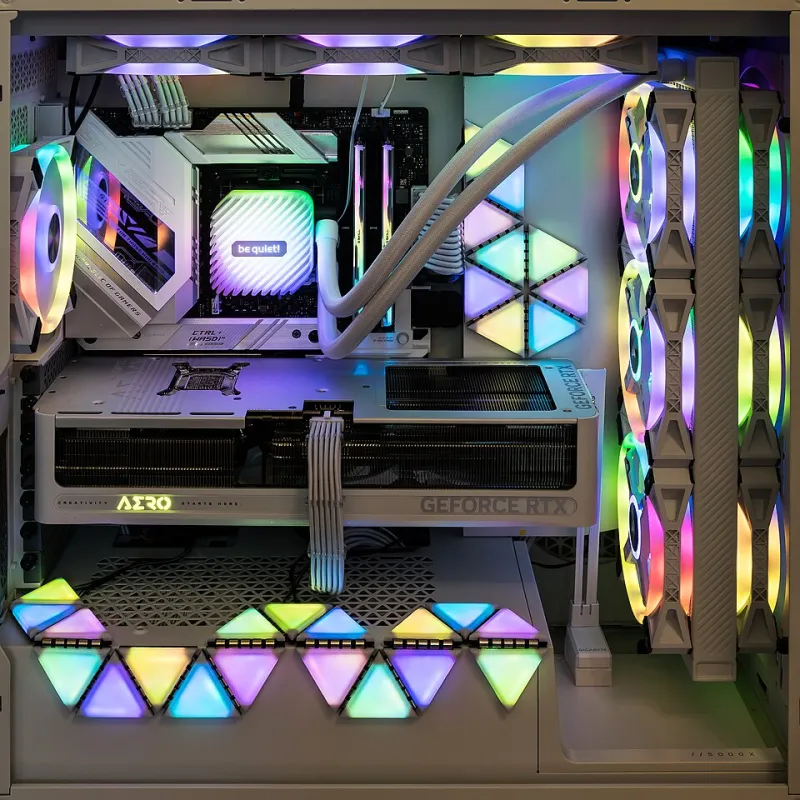
Photo: Jacek Halicki, CC BY-SA 4.0, via Wikimedia Commons
RGB has a PR problem. Some people love it, some people think it looks like a casino inside a microwave, and a lot of us fall somewhere in the middle. But the practical question is simple: does all that light actually cost you performance? At PCGamesWeb, we spent a week measuring power draw, heat, and frame rates across six lighting configurations. The short answer: most RGB is harmless. A few setups are genuinely dumb.
The test bench
We used a Ryzen 7 9800X3D, RTX 5070 Ti, 32GB DDR5, an 850W Gold PSU, and a mid-tower case with decent airflow. We measured wall power with a Kill A Watt-style meter, logged CPU and GPU temps with HWiNFO, and ran a 30-minute CPU-heavy strategy session and a 30-minute GPU-heavy shooter at 1440p. Fan curves were fixed unless noted. We tested: no RGB, peripherals only, motherboard and RAM lighting, six case fans, twelve case fans plus two strips, and a full vendor-software stack with effects on.
The short version
Peripherals added 2 to 5 watts. Motherboard and RAM lighting added 3 to 7 watts. Six lit fans added 6 to 10 watts. Twelve fans plus two strips added 15 to 25 watts. Full brightness with multiple software services added around 30 watts at the wall. Internal temps moved by 1 to 2 degrees Celsius in the worst case, and case fans spun about 100 to 150 RPM faster. Frame rates were mostly unchanged. The exception was a software conflict that cost 4 to 6 percent in 1% lows in one title.
What we actually measured
- Baseline, no lighting: 0W added, 0C added.
- Keyboard, mouse, and headset only: +3W, no measurable temp change.
- Motherboard, RAM, and GPU lighting: +5W, +0.5C.
- Six RGB case fans: +8W, +1C, +80 RPM.
- Twelve fans plus two strips: +22W, +2C, +120 RPM.
- Full software stack, effects on: +30W, +2C, 4% lower 1% lows in one game.
That last number is the one people will argue about. It was not the LEDs. It was three lighting services fighting over the same USB controller and polling devices in the background. Once we disabled two of them, the gap closed.
The real cost is not the glow
An LED is cheap to run. A fan is not. Twelve fans move air, make noise, and draw power, and the LEDs are just garnish. If you are running a dozen fans, you are already in the more-money-than-airflow zone. The lighting is not the main tax. The fan count is.
The other cost is software. Every RGB utility wants to start with Windows, poll hardware, and update firmware. One is fine. Three is a committee. We have seen iCUE, Mystic Light, Aura, and Synapse all installed on the same machine, and the result is not a light show. It is a background process buffet.
Where RGB gets genuinely bad
- You are running 100% brightness on pure white. White uses all color channels, so it draws more power than a deep blue or red.
- You have more lighting software than games installed. Pick one.
- Your RGB hub is powered by a motherboard header that is already near its limit. Check the spec.
- Your case has glass panels and decorative mesh that choke intake. That is not an RGB problem, but it is often an RGB build problem.
- You left always-on USB power enabled and wonder why the desk glows at 2 a.m. That is a BIOS setting, not a curse.
Profiles that keep the look without the tax
We set up three profiles. Stealth is a static low-brightness single color, with effects off and case lighting at 30%. It added about 6W in our test and looked clean. Gaming keeps peripherals lit, turns case strips off, and uses one software service. It added about 10W. Show is full brightness, all effects, and every fan lit. It added about 28W and 2C. If you are chasing 1% lows, use Stealth. If you have friends coming over, use Show. Just know what you are paying for.
BIOS and firmware settings worth changing
Enable ErP Ready in the BIOS if you want the board to cut standby power. Turn off onboard LEDs in sleep mode if your board supports it. Set a sane fan curve before you add more fans, because lighting software sometimes overrides it. Update firmware once, then stop. And uninstall the lighting utility you do not use. Your USB controller will thank you.
Bottom line
RGB is not costing you a meaningful number of frames in a normal build. It is costing you a few watts, a degree or two, and some background noise. The bad configurations are the ones with too many fans, too many services, and too much brightness. Keep it simple, pick one ecosystem, and spend the savings on a better cooler.